
Data Wizard
Guided bulk operations across Zendesk records — import, update, transform and clean ticket, user and organization data without hand-writing API scripts.
Focus on your customers, not your ticket data. Zenbench pulls the work Zendesk administrators normally do in scripts and spreadsheets into one console — bulk data operations, sandbox seeding, data modelling, environment promotion, backup and restore.
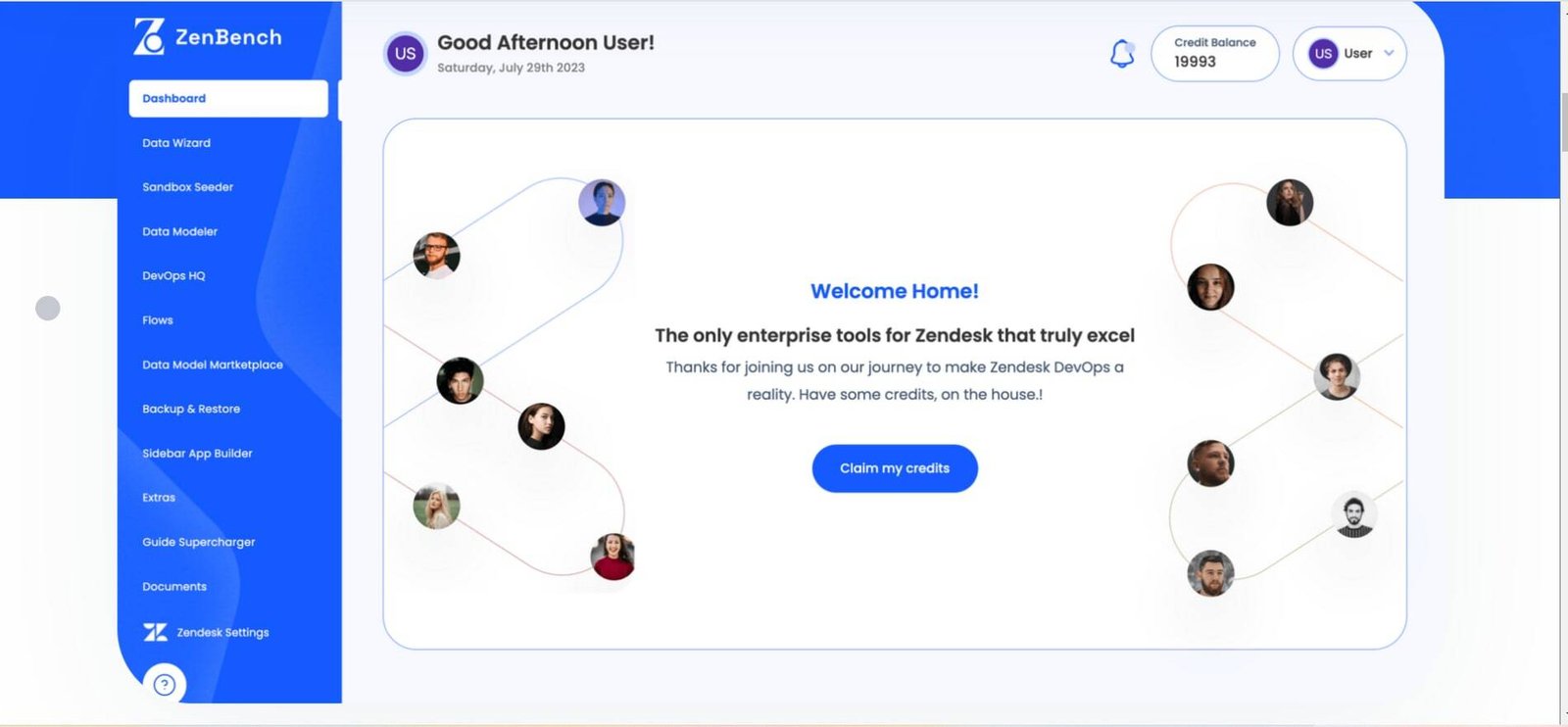
The Zenbench console — every Zendesk operation reachable from a single module rail.
Zendesk is excellent at handling tickets. It is far less helpful once an organisation needs to operate the instance itself — migrating thousands of records, standing up a realistic sandbox, documenting a custom field schema that has grown for years, or moving a configuration change from test to production without breaking live support.
In most enterprises that work falls to a small group of administrators armed with API scripts, CSV exports and spreadsheets. It is slow, it is difficult to review, and a mistake lands directly on the customers the team is supposed to be serving.
Zenbench closes that gap. Each of its modules takes one of those recurring jobs and turns it into a repeatable, reviewable operation inside a single interface — so the team's attention goes back where it belongs.
Each module owns a job that Zendesk administrators would otherwise handle by hand. Together they cover the full lifecycle of an instance — model it, seed it, change it, ship it, back it up.
Guided bulk operations across Zendesk records — import, update, transform and clean ticket, user and organization data without hand-writing API scripts.
Populates a Zendesk sandbox with realistic, structured test data so teams can rehearse changes safely before they touch production.
Maps and documents the relationships between Zendesk objects, custom fields and metadata, turning an implicit schema into something a team can actually reason about.
The control room for Zendesk change management — promoting configuration between environments and keeping instances in a known, reviewable state.
Composable automation flows that chain operations together, so repeatable admin work runs as a defined process instead of a manual checklist.
A shared library of ready-made data models and templates, letting teams start from a proven structure rather than a blank instance.
Point-in-time backups of Zendesk configuration and data, with restore paths for when a change needs to be rolled back.
Build custom Zendesk sidebar apps for agents without a full app-development cycle, surfacing the context agents need directly in the ticket view.
Extends Zendesk Guide with capabilities the stock knowledge base does not cover, for teams running large documentation estates.
Centralised document handling tied to the Zendesk workspace, keeping supporting material alongside the data it belongs to.
Supplementary utilities that fill the smaller day-to-day gaps admins hit once they are operating Zendesk at scale.
The five ideas the platform is built around — and the reason it reads as one tool rather than a pile of utilities.
Streamline operations so teams spend their time on customers, not on wrangling ticket data. The interface is built to minimise distraction and maximise throughput.
Robust capabilities aimed squarely at large organisations — the features enterprise Zendesk teams actually need, without the bloat that usually comes with them.
Designed to slot into an existing Zendesk setup. No additional plugins to install and no complex configuration to unpick before it becomes useful.
Fast, reliable and secure by design, and built to stay responsive when it is handling high volumes of records.
A clean, modern console that a support team can navigate on day one, so adoption is not gated behind a long training programme.
A platform of this shape touches most of the hard parts of enterprise SaaS at once. These are the domains it exercises — and the kind of work we take on.
Zenbench is an enterprise tooling platform for Zendesk. It gathers the operations that Zendesk administrators normally handle through scripts, spreadsheets and one-off API calls — bulk data work, sandbox seeding, data modelling, environment promotion, backup and restore — into a single console, so support teams can focus on their customers instead of their ticket data.
No. Zenbench is an enterprise platform we have worked on, and it appears here as work experience rather than as something WebPenter sells. Our own products — such as Email Log Guru and Register Radar — are listed separately under Products.
Organisations running Zendesk at scale: teams with large agent counts, heavily customised instances, strict change-management requirements, or a genuine need to move configuration and data between sandbox and production without risk.
Heavier operations are metered against a credit balance shown in the console header, so usage of the platform's most expensive actions is measured and budgeted rather than unlimited.
Yes. The engineering behind a platform like this — multi-tenant SaaS, deep third-party API integration, bulk data pipelines, environment promotion and usage-based billing — is the kind of work we take on. Get in touch and we can talk through your requirements.
Multi-tenant SaaS, deep API integration, bulk data pipelines, environment promotion, usage-based billing — if your project looks like this, we should talk.